Cloud Security for Remote Teams: How to Stay Secure Outside the Office
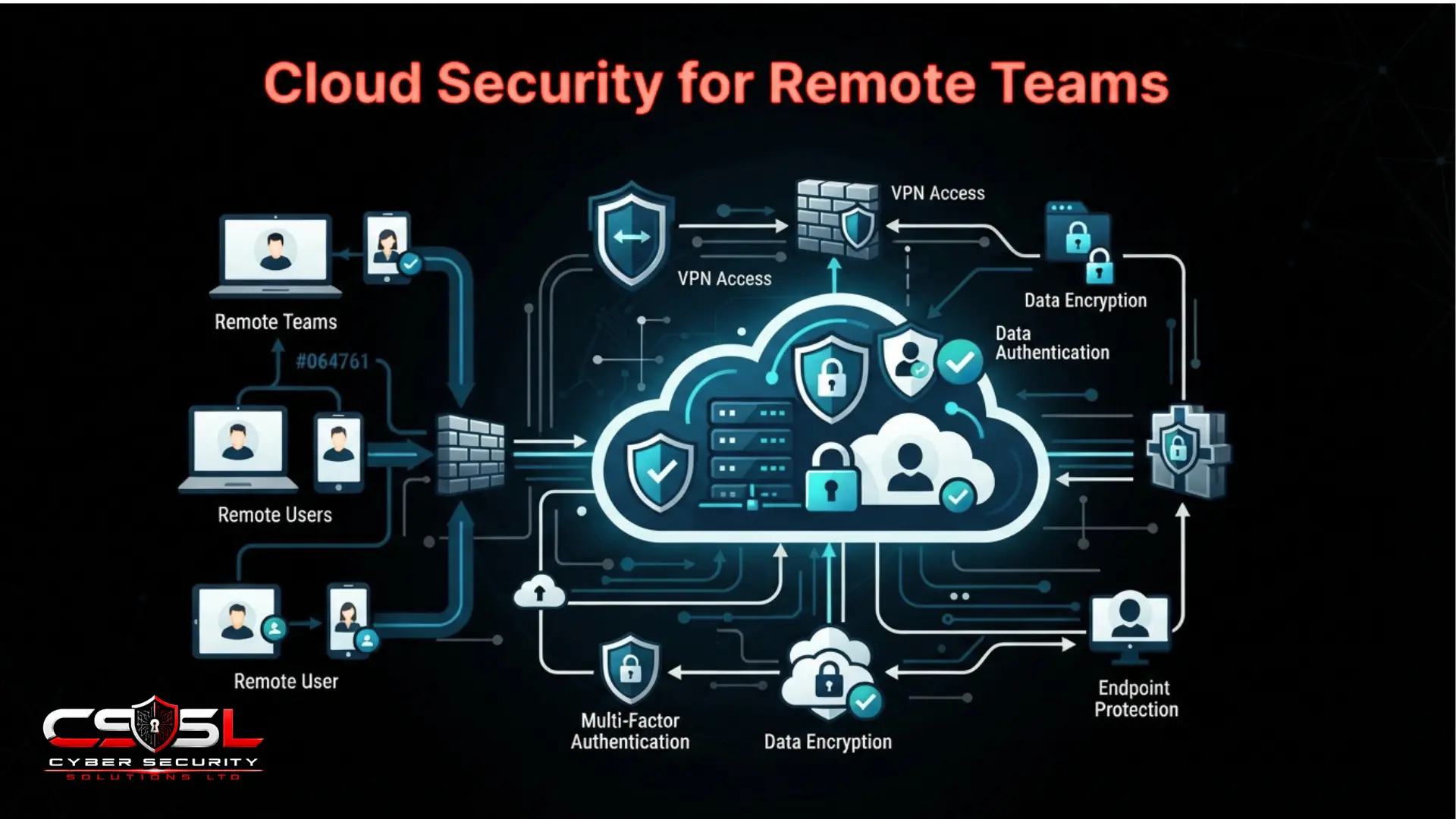
Cloud security for remote teams means securing access to cloud resources from outside a managed office network, not just adding a VPN and calling it done. If you enforced MFA everywhere and still had an account compromised through a stolen session token, this guide explains exactly what MFA alone does not cover.
What Does Cloud Security for Remote Teams Mean, and Why Isn’t This an Industry Vertical?
This means securing access to cloud resources from outside a managed office network, replacing perimeter based trust with zero trust principles like Conditional Access, and addressing device diversity, home network risk and cross border data residency a fixed office location never had to consider.
Prior posts in this series addressed distinct industries. This post addresses a work modality cutting across every one of them, since a healthcare provider, a financial services firm and a small business can all have distributed teams simultaneously. This is the access and endpoint layer sitting underneath whichever sector a team happens to work in, not sector specific compliance content.
This post assumes shared responsibility, zero trust principles and cloud IAM fundamentals already established elsewhere in this series, applied here to the distributed workforce context.
Why Did the Disappearance of the Office Network Make Remote Work Both Possible and Risky at the Same Time?
Cloud computing removed the network perimeter as the primary security boundary, and remote work is the clearest, most human expression of that same shift, since there is no longer any office network for a security team to anchor trust around even if they wanted to.
Organizations adopted cloud specifically because it made location independent access possible, often faster than the identity centric security model needed to secure that access caught up in practice.
This section names a third, distinct category of cloud security challenges: no office network to anchor around, genuinely diverse and often unmanaged device populations, and home network variability the organization has no visibility into, distinct from the technical discipline and risk assessment meanings already established elsewhere in this series.
VPN vs ZTNA: Which Remote Access Model Actually Fits a Cloud-First, Distributed Team?
A traditional VPN typically grants broad network level access once connected, functionally recreating a version of the old office perimeter for whoever holds valid credentials.
| Criteria | VPN | ZTNA |
| Trust model | Trusts the network once connected | Trusts nothing by default, verifies per session |
| Access granularity | Broad, network-level | Narrow, application or resource-specific |
| Device posture evaluation | Rarely built in | Often evaluated before each access grant |
| Blast radius if compromised | Large, full network reach | Small, limited to authorized resource |
Zero Trust Network Access grants access only to the specific application or resource explicitly authorized, evaluated per session rather than once at connection, reflecting zero trust principles already established elsewhere in this series.
This comparison matters specifically for remote teams. A compromised VPN credential from an unmanaged home device grants an attacker the same broad network reach a legitimate remote employee has, while ZTNA’s narrower model limits that blast radius. Full ZTNA implementation depth belongs to the dedicated network security content; this section’s job is the decision-relevant comparison.
What Risk Does BYOD and Personal Device Access Genuinely Introduce?
A company-issued, enrolled device can have its compliance status, patch level, disk encryption, security software presence, checked and fed into an access decision. A personal device frequently cannot, meaning the organization grants cloud access with considerably less assurance about the device’s own security posture.
Device compliance status is precisely one of the context signals Conditional Access evaluates before granting access, the concrete mechanism that converts this risk into an actionable control.
MDM and MAM are the two common responses. MDM manages the entire device, appropriate for company-owned hardware. MAM manages only the specific corporate applications on an otherwise personal device, often the more acceptable trade-off for genuine BYOD scenarios. CASB’s reverse proxy mode suits this scenario too, since it requires no client-side agent.
Why Is Home Network Security a Distinct Challenge with No Office Equivalent?
An office network is segmented, monitored and configured by the organization’s own IT team. A home network is typically a single, flat network shared with a router of unknown patch status, other household members’ devices and a growing number of consumer IoT devices with their own independent vulnerabilities.
A compromised smart device or a family member’s own infected laptop sharing that home network represents a lateral movement path into the work device that no cloud-side control can see or prevent directly.
The organization cannot secure an employee’s home router, but can require baseline practices as part of acceptable use provisions, and can ensure the work device carries its own independent protection rather than relying on network-level trust at all.
What Is Session Hijacking, and Why Does It Matter More for Remote and BYOD Access Specifically?
Session hijacking occurs when an attacker steals an already-authenticated session token, bypassing the need to defeat MFA or steal a password at all, since the session has already completed that verification step.
Why do unmanaged networks and devices make this materially more likely? A session token intercepted or extracted from a compromised or poorly secured personal device, or captured over an insecure home or public network, hands an attacker a fully authenticated session without ever needing to trigger a fresh, MFA-challenged login.
Here is why this genuinely undermines the false sense of security MFA alone can create. An organization that has enforced MFA universally may still be exposed to this specific attack vector, since MFA protects the login event, not necessarily the ongoing session that follows it.
Practical mitigation includes shorter session lifetimes and re-authentication triggers for sensitive actions, device-bound session tokens where the platform supports them, and the continuous, per-session verification principle already established generically elsewhere in this series, now applied concretely to this specific threat.
How Does Remote Work Amplify Shadow IT Risk Specifically?
A remote employee lacks the informal, ambient oversight of colleagues and IT staff physically nearby, and faces genuine, practical friction, a slow VPN, a blocked file-sharing site, that a colleague sitting near the IT desk simply would not encounter, making personal Dropbox, WhatsApp file sharing or a personal email forward a more tempting, low-friction workaround.
CASB’s log-based discovery becomes more, not less, important here, the practical tool for surfacing this amplified risk before it becomes a genuine data exposure incident.
What Cloud Security Risks Are Unique to Remote Developers Holding Privileged Access?
This is not code and pipeline territory, covered fully elsewhere in this series. This is the human and endpoint context around a developer who happens to work remotely.
The specific, concrete risk worth naming directly: cloud CLI credential files, kubeconfig files and locally cached authentication tokens routinely sit unencrypted on a developer’s own laptop, meaning that laptop itself becomes an extension of the cloud environment’s own privileged access surface the moment it leaves a managed office network.
Why does this connect directly to CIEM coverage already established elsewhere in this series? A developer’s locally stored credentials frequently carry far broader permissions than the specific task at hand requires, exactly the excessive-permission pattern CIEM is built to surface, now sitting on an endpoint the organization has considerably less visibility into.
Practical mitigation includes short-lived, frequently-rotated credentials rather than long-lived local tokens, hardware security keys for developer authentication where the workflow allows it, and full-disk encryption as a genuine baseline requirement for any device holding this class of credential regardless of ownership.
What Happens When Your Team Works Across Borders and Jurisdictions?
An employee working remotely from a different country than the organization’s primary jurisdiction can itself trigger data residency and cross-border transfer questions, independent of any deliberate migration or infrastructure decision.
UK GDPR’s territorial scope is worth naming directly. Processing personal data in connection with an employee based outside the UK or EU can raise international transfer obligations a purely domestic remote work policy may not have anticipated.
Why is this ongoing, not one-time? An earlier post in this series addressed data residency as a decision made once during a migration project. This section’s concern is the continuous, shifting reality of where data is actually being accessed from as employees relocate, travel, or work temporarily abroad.
The practical response is maintaining visibility into where remote access genuinely originates from, and treating a sustained change in working location as a compliance review trigger, not purely an HR matter.
How Do You Write Remote-Work Provisions into Your Existing Cloud Security Policy?
This is not a second, competing policy document. These are specific provisions that slot into the existing seven-domain policy template already established elsewhere in this series.
Acceptable use provisions cover personal device use and home network expectations. Identity and access management provisions cover device compliance requirements for Conditional Access. The monitoring statement extends to cover remote and BYOD access patterns.
Worked example language: “Personal devices accessing corporate cloud resources must meet the minimum security baseline defined in the Technical Standards document, verified through Conditional Access device compliance checks before access is granted.”
Reviewing device policy, session security and Conditional Access configuration together is exactly the remote access assessment Cyber Security Solutions Ltd runs for distributed teams. A policy silent on remote-specific provisions leaves the kind of ambiguity already established elsewhere in this series as the direct cause of unaddressed responsibility gaps.
How Do You Build a Secure Remote Access Baseline Step by Step?
Building a secure baseline starts with the VPN versus ZTNA decision, classifying devices by managed status, configuring Conditional Access for device compliance, reducing session lifetimes, extending CASB discovery to remote traffic, reviewing developer credentials with CIEM, triggering compliance review on location changes, and writing the resulting provisions into your existing policy.
| Risk Type | Example | Primary Control |
| BYOD / unmanaged devices | Personal laptop with no compliance check | MDM/MAM, CASB reverse proxy |
| Home network variability | Unpatched router, shared IoT devices | Baseline acceptable use provisions |
| Session hijacking | Stolen authenticated session token | Shorter session lifetimes, device-bound tokens |
| Developer credentials on endpoints | Unencrypted kubeconfig on a laptop | Short-lived credentials, CIEM review |
| Cross-border data residency | Employee relocates to another country | Location-change compliance review trigger |
- Evaluate whether your VPN-based remote access should be supplemented or replaced with ZTNA, based on the trust-model comparison above.
- Classify your device population into managed, MDM/MAM-enrolled and fully unmanaged personal categories.
- Configure Conditional Access to evaluate device compliance before granting access, not identity alone.
- Reduce session lifetimes for sensitive systems and enable device-bound tokens where supported.
- Extend your CASB’s shadow IT discovery specifically to remote workforce traffic patterns.
- Apply CIEM review to developer credentials stored locally on remote endpoints, prioritizing short-lived tokens.
- Establish a process for reviewing compliance implications when an employee’s working location changes.
- Draft and incorporate the remote-work-specific provisions above into your existing cloud security policy.
Conclusion
Cloud security for remote teams is not solved by a VPN and a checkbox for MFA. Session hijacking defeats MFA once a session exists, a developer’s laptop carries privileged cloud credentials wherever it goes, and a relocated employee can quietly change your compliance obligations. Address all three directly, not just device diversity in the abstract. To get a remote access security review covering device policy, session security and Conditional Access configuration, visit cybersecuritysolutionsltd.com for expert support from Cyber Security Solutions Ltd.
FAQs
Often not on its own. A VPN grants broad network access once connected, recreating a version of the old office perimeter for anyone with valid credentials. ZTNA grants access only to specific authorised resources per session, limiting the damage if credentials are compromised.
Not fully. MFA protects the login event itself. Session hijacking steals an already-authenticated session token, bypassing the need to defeat MFA at all since that verification already happened. Shorter session lifetimes and device-bound tokens address this gap MFA alone does not cover.
MDM manages an entire device, appropriate for company-owned hardware. MAM manages only the specific corporate apps and data on an otherwise personal device, a materially different and often more acceptable trade-off for genuine bring-your-own-device scenarios where the person owns the hardware.
Cloud CLI tokens, kubeconfig files and cached credentials often sit unencrypted on a developer’s laptop, carrying broader permissions than needed for the task at hand. That laptop becomes an extension of your cloud environment’s own privileged access surface once it leaves a managed network.
It can. Processing personal data in connection with an employee based outside your primary jurisdiction can raise international transfer obligations a domestic remote work policy may not have anticipated. Treat a sustained location change as a compliance review trigger, not just an HR matter.
Home networks are typically flat, shared with other household devices and consumer IoT products of unknown security status. You cannot secure an employee’s router directly, but you can require baseline practices and ensure the work device carries its own independent protection.