Azure Cloud Security: How to Secure Microsoft Azure Environments
Azure’s shared responsibility model shifts by service, with customers holding full patching and network configuration responsibility on Virtual Machines, only code and managed identity scoping on Azure Functions, and complete access control responsibility on Blob Storage regardless of how the underlying storage is managed.
If you have subscriptions scattered across different management groups with no consistent policy applied to any of them, or you enabled Defender for Cloud and assumed you were fully covered, then found out you were only on the free tier, this guide gives you the concrete Azure mechanics that fix both problems.
What Does Azure-Specific Security Add Beyond the General Principles Already Covered in This Cluster?
Every principle this cluster has established, CSPM, IAM, zero trust, shared responsibility, applies fully to Azure. This guide shows what those principles look like against Azure’s actual named services, consoles, and permission model. Microsoft Entra ID, Microsoft Sentinel, Microsoft Purview, and Microsoft Defender for Cloud have each been named individually elsewhere without being assembled into one coherent Azure-specific reference until now.
A clarifying scope note worth stating early: Azure infrastructure and Microsoft 365 productivity applications are distinct products, though Entra ID itself is not Azure-specific at all. It is the shared identity backbone spanning the entire Microsoft ecosystem, including both Azure and Microsoft 365 simultaneously.
How Does Shared Responsibility Play Out Across Specific Azure Services?
| Service | Microsoft Responsibility | Customer Responsibility |
| Azure Virtual Machines | Physical infrastructure, hypervisor | Guest OS patching, NSG configuration, network access |
| Azure Functions | Entire runtime environment | Function code, dependencies, managed identity scope |
| Azure SQL Database | Engine patching, underlying infrastructure | Access control, encryption configuration, query security |
| Blob Storage | Storage infrastructure | Access control, SAS token issuance, encryption settings |
Azure’s shared responsibility model shifts by service. Customers hold full patching and network configuration responsibility on Virtual Machines, the broadest responsibility surface within Azure. On Azure Functions, Microsoft manages the entire runtime, and the customer is responsible only for function code, dependencies, and the scope of the managed identity attached to it. On Azure SQL Database, Microsoft manages engine patching and underlying infrastructure, while the customer manages access control, encryption configuration, and query-level security. On Blob Storage, Microsoft manages the storage infrastructure entirely, but the customer holds full responsibility for access control, SAS token issuance, and encryption settings.
A single subscription commonly runs VMs, Functions, SQL Database, and Blob Storage together, each with a different responsibility line, meaning most real Azure environments manage several responsibility profiles simultaneously rather than one uniform calculation.
How Does Azure’s Resource Hierarchy Differ Structurally from AWS’s Account Model?
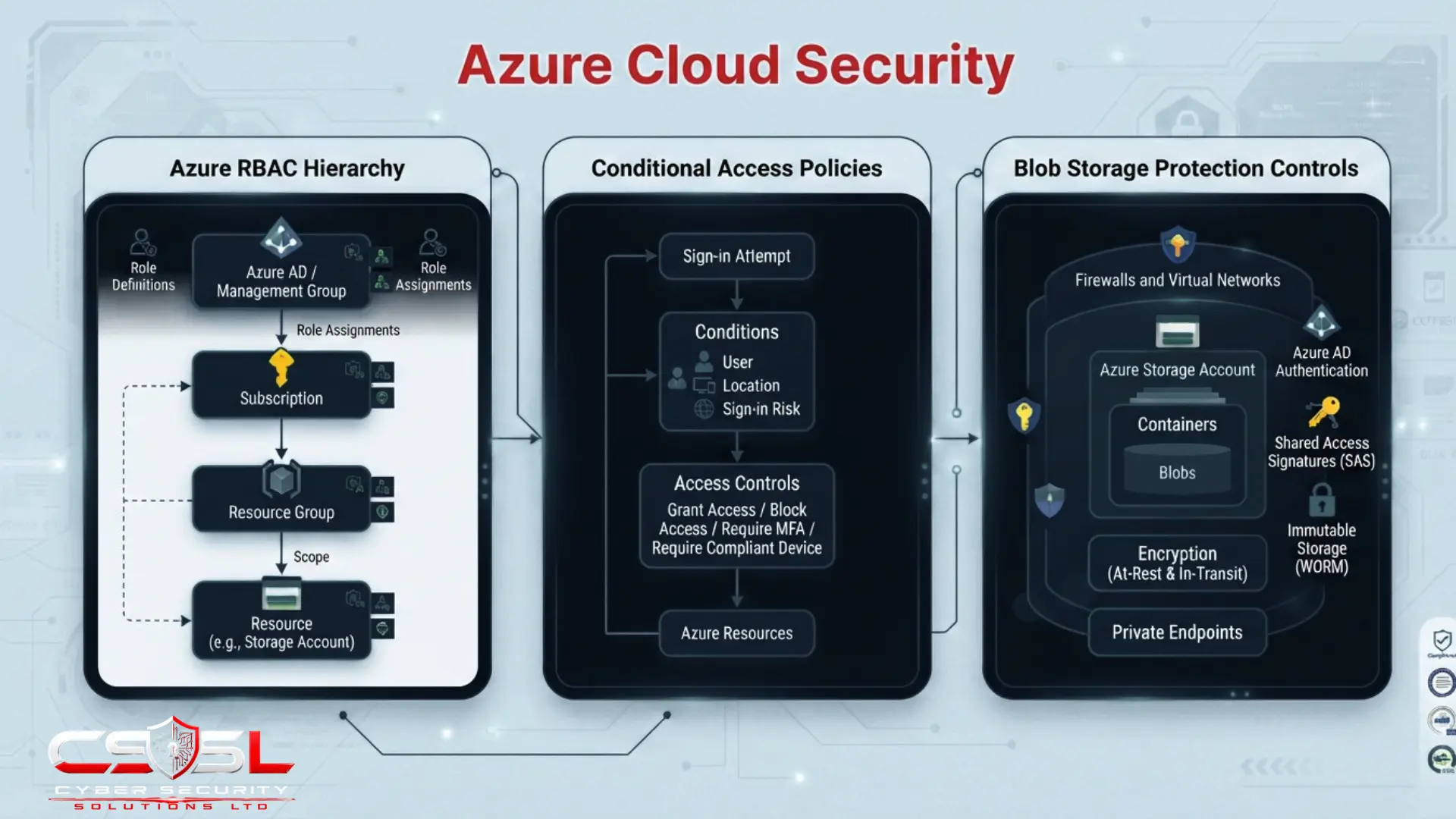
Azure organizes resources across four nested levels: Management Groups grouping multiple subscriptions under shared policy, Subscriptions as the primary billing and access boundary, Resource Groups as logical containers for related resources within a subscription, and individual Resources themselves. Policy and role assignments applied at any level cascade downward automatically through inheritance.
This structural contrast with AWS deserves explicit statement rather than the common assumption that Azure’s hierarchy is simply Azure’s version of AWS Organizations relabelled. AWS Organizations manages a comparatively flatter structure of accounts, with Service Control Policies applied at the account or organizational-unit level as a guardrail layer sitting above individually-evaluated IAM policy documents. Azure’s Management Group layer sits explicitly above subscriptions as a genuinely deeper hierarchical level, and both policy and role assignments cascade downward through inheritance automatically once applied anywhere in that chain.
The practical implication is a genuinely different design discipline. Designing a secure Azure environment means deliberately deciding at which specific level of this four-tier hierarchy each policy and role assignment should live, since assigning too high risks unintended inheritance cascading down to resources that should never have received that permission, while assigning too low recreates the same per-resource-group inconsistency problem that undermines any landing zone’s governance value. An administrator moving from AWS to Azure who assumes the two models work identically, simply with different console names, will likely misjudge exactly where a given policy or role assignment should be applied, because the underlying mental model, hierarchical cascade versus flatter multi-document reconciliation, genuinely differs between the two platforms rather than merely using different terminology for the same concept.
Azure Policy deserves specific mention as a distinct enforcement layer separate from RBAC. Azure Policy might enforce that all storage accounts must use encryption, a configuration-state requirement, while RBAC separately governs who is permitted to modify that storage account’s settings in the first place, an identity-permission question. Azure separates these two concerns more explicitly through distinct tooling than AWS’s SCP model does, and understanding this distinction prevents administrators from expecting RBAC alone to enforce configuration standards it was never designed to govern.
How Do Azure RBAC and Conditional Access Work Together?
| Criteria | RBAC | Conditional Access |
| What it governs | What an identity can do | Whether an identity can authenticate at all |
| When it applies | After authentication succeeds | At the moment of sign-in |
| Primary mechanism | Role assignments at hierarchy scope | Context-aware policy evaluation |
| Example use case | Grant read access to a resource group | Require compliant device before sign-in |
Azure RBAC uses role definitions, built-in or custom, defining a set of permissions, bound to security principals through role assignments made at a specific scope in the hierarchy, with permissions inheriting downward automatically. This is a comparatively more additive, hierarchy-driven mechanic than AWS’s evaluation logic, with the scope at which a role is assigned doing most of the structural work rather than reconciling several separate policy document types.
Conditional Access represents this article’s strongest original contribution, because it is the direct, concrete payoff of zero trust principles that often remain frustratingly abstract elsewhere. Where zero trust content establishes dynamic policy evaluation and per-session, per-resource authorization as tenets worth adopting, Conditional Access is Azure’s actual, configurable mechanism for exactly that: policies evaluating device compliance, location, sign-in risk, and application sensitivity at the moment of authentication itself, before RBAC’s permissions ever come into play at all.
This is genuinely something a reader can turn on today, not just an architectural philosophy to admire from a distance. A Conditional Access policy can require a compliant, managed device before allowing sign-in to a sensitive application, can block sign-in entirely from locations outside expected geographic patterns, or can require additional authentication challenges when Entra ID’s own risk signals flag a sign-in attempt as statistically unusual for that specific user. None of this requires touching a single RBAC role assignment, because Conditional Access operates at an earlier stage entirely: it governs whether an identity is even permitted to authenticate under the current context, while RBAC separately governs what that identity can do once authentication has already succeeded.
The two are complementary, not overlapping, and a genuinely secure Azure environment configures both deliberately rather than relying on RBAC alone. An organization with meticulously scoped RBAC role assignments but no Conditional Access policies has secured what an authenticated identity can do, while leaving the authentication decision itself governed only by a password, with no context-aware check on device health, location, or risk signal at all. Privileged Identity Management extends this same zero trust logic to privileged roles specifically, Entra ID’s native implementation of just-in-time access, allowing privileged roles to be activated only for a defined, time-bound window rather than held permanently as standing access. Managed Identities complete this identity picture for non-human credentials, letting Azure resources authenticate to each other without any embedded, manually-rotated credential at all, directly closing the non-human identity governance gap that traditional service accounts and API keys create elsewhere.
How Do You Secure Azure Blob Storage, the Most Common Source of Azure-Specific Misconfiguration?
Storage account public access settings are configurable at both the storage account and individual container level, requiring explicit review rather than assuming a single account-wide setting governs every container consistently. Enabling default encryption and soft-delete for blob data protects against both unauthorized access and the ransomware-targets-backups pattern.
Shared Access Signatures deserve dedicated, explicit treatment as a distinctly Azure mechanic carrying its own genuine, easily overlooked configuration risk, since this token type operates outside RBAC’s normal evaluation path entirely and has no direct equivalent in other major cloud platforms’ storage access models.
A SAS token is a time-limited, scoped credential granting specific access to Blob Storage resources without exposing the storage account’s master access keys. This is genuinely useful for legitimate scenarios, granting a third-party application temporary read access to a specific container, for instance, without handing over full account credentials. The risk emerges specifically because a SAS token, once issued, functions as a standing credential completely independent of RBAC. Someone conducting a thorough RBAC review, confirming every role assignment across the entire subscription hierarchy is appropriately scoped, can complete that review with full confidence while a forgotten, overly broad, or improperly long-lived SAS token continues granting access entirely outside that review’s scope, since RBAC review does not examine SAS token issuance at all.
An organization that generated a SAS token months or years ago for a specific integration, and never set or tracked its expiry, has effectively created a standing access credential that bypasses every subsequent RBAC tightening exercise the organization has since completed. The token continues working exactly as originally scoped, regardless of how much the surrounding RBAC configuration has since been hardened. The practical discipline this requires is treating SAS token audit as its own distinct security review activity, separate from RBAC review, specifically checking token scope, expiry configuration, and whether any long-lived or unexpired tokens still exist that nobody remembers issuing.
Microsoft Purview’s data classification and protection capability, distinct from its separately established compliance evidence collection role, scans Blob Storage and other Azure data stores for sensitive data patterns, functioning as Azure’s native equivalent to the DSPM discipline. Purview serves genuinely two separate functions worth recognizing independently: one collecting compliance evidence, the other discovering and classifying what sensitive data actually exists across your Azure estate.
What Native Azure Security Tools Should Form Your Baseline Stack?
Microsoft Defender for Cloud provides a Foundational, free CSPM tier for baseline posture visibility, with paid, resource-type-specific Defender plans, Defender for Servers, Storage, Containers, and SQL, each priced and enabled separately. Microsoft Sentinel serves as the correlation and monitoring layer sitting above Defender for Cloud’s findings. Microsoft Entra ID and Conditional Access form the identity and access layer. Microsoft Purview provides both compliance evidence collection and data classification. Azure Policy and Azure Monitor provide configuration enforcement and audit logging respectively.
Tiering awareness matters more here than for any other Azure topic in this article, because confirming which specific Defender plans are active is the single most common gap between assumed and actual Azure protection coverage.
We have Defender for Cloud is a statement that can describe dramatically different actual protection depending entirely on which specific plans sit behind it. An organization running only the free Foundational tier has baseline CSPM visibility, configuration recommendations, and secure score tracking, genuinely useful but fundamentally limited to posture assessment. An organization that has additionally enabled Defender for Servers gains active threat detection and vulnerability assessment specifically for virtual machines. An organization that has separately enabled Defender for Storage gains threat detection specifically scoped to storage account activity, a distinct and separate purchase from Defender for Servers despite both sitting under the same overall Defender for Cloud umbrella name.
This licensing structure genuinely parallels a confusion pattern already documented in Microsoft’s own productivity licensing, where a single umbrella product name conceals meaningfully different actual capability depending on which specific tier sits behind it. The practical consequence mirrors that pattern precisely: an organization can genuinely believe its container workloads are actively monitored for threats, because Defender for Cloud is enabled, while Defender for Containers specifically was never activated, meaning that specific resource type has received no active threat detection at all despite the umbrella product name suggesting comprehensive coverage. Before relying on Defender for Cloud protection claims for any specific resource type, confirm directly which resource-specific plan is actually enabled for that resource type.
How Do You Secure Azure Compute — VMs, Functions and Container Services?
Azure VMs represent the customer’s fullest responsibility surface, requiring guest OS patching, Network Security Group configuration, and general workload protection practices. Azure Functions require scoping the function’s managed identity as narrowly as it genuinely requires, mirroring the execution role discipline established for serverless computing generally.
Azure Kubernetes Service, Azure’s managed Kubernetes offering, requires general Kubernetes control-plane security practices alongside Azure-specific identity integration through Microsoft Entra Workload ID, letting individual Kubernetes workloads assume scoped Azure permissions rather than sharing one broad node-level identity. Azure Container Registry is the natural point for container image scanning before deployment to AKS, catching known vulnerabilities before an image ever reaches a running workload.
What Does the Azure Well-Architected Framework’s Security Pillar Recommend?
Microsoft’s official architectural guidance for the Security pillar is explicitly built around zero trust principles: verify explicitly, apply least-privilege access, and assume breach. Unlike other major providers’ Well-Architected frameworks, organized around a broader set of general principles, Azure’s own guidance names zero trust as its explicit foundation, giving this pillar a direct, stated link to zero trust architecture rather than an inferred one. Use it as a structured, Azure-specific self-assessment lens complementing general architecture guidance.
What Azure-Specific Compliance and Government Cloud Options Exist?
Azure Government is the direct, concrete Azure instantiation of FedRAMP requirements, an isolated cloud environment designed for US government agencies and contractors requiring FedRAMP High and other stringent compliance requirements. The CIS Microsoft Azure Foundations Benchmark is the Azure-specific configuration baseline that Defender for Cloud and other CSPM tooling evaluate environments against. Microsoft Compliance Manager and Microsoft Trust Center provide on-demand access to Microsoft’s own compliance certifications and audit reports.
Is Azure Security Engineer Certification Worth Pursuing, or Does General Cloud Expertise Suffice?
General cloud security principles transfer across providers, but Azure’s specific mechanics, the resource hierarchy, RBAC inheritance, and Conditional Access, genuinely reward dedicated platform expertise at meaningful scale. The Microsoft Certified: Azure Security Engineer Associate credential is a named, relevant professional certification worth considering for teams reaching this point. Organizations lacking in-house Azure-specific depth may reasonably consider an MSSP with genuine Azure specialism as an alternative to building that depth internally.
Cyber Security Solutions Ltd helps organizations assess whether their team’s Azure-specific depth is sufficient or whether specialist certification, hiring, or managed support genuinely fits their environment’s complexity.
How Do You Build an Azure Security Baseline Step by Step?
Step 1: Structure your Management Group, Subscription, and Resource Group hierarchy deliberately, deciding at which level each policy and role assignment should live.
Step 2: Apply Azure Policy definitions to enforce required configurations across subscriptions, separate from RBAC role assignments.
Step 3: Enable Conditional Access policies governing device compliance, location, and sign-in risk before relying on RBAC permissions alone.
Step 4: Review storage account and container-level public access settings, and audit existing SAS token scope and expiry.
Step 5: Enable the specific Defender for Cloud plans relevant to your resource types, not just the free Foundational tier.
Step 6: Scope Azure Function managed identities and AKS workload identities as narrowly as each workload genuinely requires.
Step 7: Enable Microsoft Purview’s data classification capability alongside its compliance evidence collection role.
Step 8: Benchmark your environment against the CIS Microsoft Azure Foundations Benchmark and the Well-Architected Framework’s Security pillar.
Conclusion
Securing Azure effectively means understanding that its hierarchical RBAC model genuinely differs from AWS’s approach, that Conditional Access turns zero trust from philosophy into a configurable policy, and that native tools like Purview and Defender for Cloud require careful tier verification rather than assumed coverage. Visit cybersecuritysolutionsltd.com for an Azure security audit that identifies exactly which hierarchy level, policy, or Defender plan needs your attention first.
FAQs
It shifts by service. Customers hold full patching and network configuration responsibility on Virtual Machines, only code and managed identity scoping on Azure Functions, and complete access control responsibility on Blob Storage regardless of how the underlying storage is managed by Microsoft.
Azure RBAC is hierarchical and inheritance-based, with role assignments cascading downward from Management Groups through Subscriptions to Resources. AWS IAM requires reconciling several separately-evaluated policy documents simultaneously, a flatter, more additive model. The two use genuinely different mental models, not just different terminology.
Conditional Access is Azure’s concrete implementation of zero trust’s dynamic policy evaluation principle, checking device compliance, location, and sign-in risk at the moment of authentication itself. It governs whether an identity can authenticate at all, complementing RBAC, which governs what an authenticated identity can then do.
A SAS token is a time-limited, scoped credential granting access to Blob Storage without exposing master keys. It operates entirely outside RBAC’s evaluation path, meaning a forgotten or long-lived token can grant standing access that no RBAC review would ever surface or revoke.
No. The free Foundational tier provides baseline CSPM visibility only. Active threat detection for specific resource types, servers, storage, containers, SQL, requires separately enabling the corresponding paid Defender plan for each resource type you want actively monitored.
It depends on your environment’s scale and complexity. General cloud security knowledge transfers across providers, but Azure’s specific mechanics genuinely reward dedicated expertise once your environment reaches meaningful scale, whether through certification, hiring, or an Azure-specialist MSSP relationship.