Out-of-Band CASB: How API-Based Deployment Works
Many teams assume a cloud access security broker has to sit in the middle of every connection. It does not. An out-of-band CASB connects straight to your SaaS apps through their APIs, scans the data already stored there and fixes risky sharing, with no proxy, no agents and no change to how staff connect.
What Is an Out-of-Band CASB?
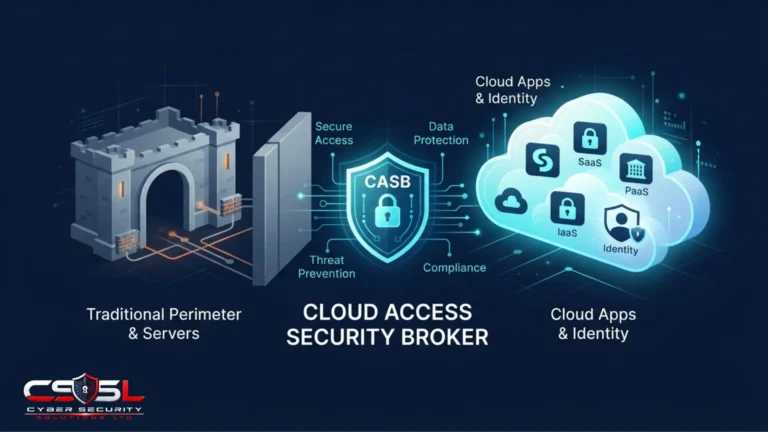
An out-of-band CASB is a cloud access security broker that connects directly to sanctioned SaaS apps, such as Microsoft 365, Google Workspace or Salesforce, through their APIs instead of sitting inline in user traffic. It scans data already stored in the cloud, detects risky sharing, compromised accounts and misconfigurations, and fixes issues by calling the app’s own API.
Out-of-Band vs Inline: The Core Difference
An inline CASB sits in the traffic path, so every request passes through it and can be blocked before it happens. An API-based CASB sits beside the app. It reads what has already happened, through the app’s API and activity logs, and then acts. One prevents in the moment. The other finds and fixes after the event, across everything stored.
Why “API-Based” and “Out-of-Band” Mean the Same Thing
“Out-of-band” describes where the CASB sits: outside the data path. “API-based” describes how it connects: through the SaaS provider’s application programming interfaces. In CASB products, they describe the same deployment mode.
The Problem API Mode Solves
Inline CASBs see only traffic that passes through them. A file shared publicly three years ago, a contractor using a personal laptop that never touches your proxy, or a third-party app with standing access to every mailbox: none of these cross the inline path today. They are already inside the SaaS app. An API connection sees them because it looks at the app itself, not at the network.
How Does API-Based CASB Deployment Work?
Step 1: Connecting the CASB to SaaS Apps With OAuth and Admin Consent
An administrator authorizes the CASB in each SaaS app, usually by granting OAuth consent to an app registration with defined permissions. Microsoft Defender for Cloud Apps, for example, uses app connectors built on each provider’s APIs. Review the permissions requested, because a CASB with broad write access is itself a high-value target.
Step 2: Discovering Users, Files and Third-Party Apps
The CASB pulls lists of users, groups, files, sharing settings, activity logs and connected third-party apps.
Step 3: Retroactive Scanning of Data at Rest
It then scans stored content for sensitive data, such as personal, health or payment card information, and flags files shared outside the company. This retroactive scan covers data that existed before the CASB was installed.
Step 4: Policy Enforcement Through API Actions (Quarantine, Unshare, Revoke)
When a policy matches, the CASB calls the app’s API to act: remove a public link, quarantine a file, suspend a user, force a password reset or revoke a risky third-party app’s token.
The Three CASB Deployment Modes Compared
Forward Proxy CASB
Traffic from managed devices is routed through the CASB, usually with an agent or a network setting. It can control any cloud app those devices reach, including unsanctioned ones.
Reverse Proxy CASB
The CASB sits in front of a specific SaaS app, and sign-ins are redirected through it, often by the identity provider. It works for unmanaged devices because nothing is installed on them. Microsoft Defender for Cloud Apps provides this through Conditional Access App Control.
API (Out-of-Band) CASB
Connects to the app itself and works on stored data and logged activity, for any user and any device.
Comparison Table: Coverage, Latency, Device Needs and Blind Spots
| Forward proxy | Reverse proxy | API (out-of-band) | |
|---|---|---|---|
| Where it sits | Between managed devices and the internet | In front of specific SaaS apps | Beside the app, connected by API |
| Enforcement timing | Real time | Real time | Near real time, after the event |
| Device requirements | Agent or network routing on managed devices | None on the device | None |
| Covers data already stored | No | No | Yes |
| Covers unsanctioned apps | Yes | No | No |
| Main blind spot | Unmanaged devices | Apps and sessions not routed through it | Real-time blocking, apps without APIs |
Benefits of Out-of-Band CASB
No Agents, No Traffic Rerouting and No Latency
Because traffic never passes through it, an API CASB adds no delay and cannot break app sessions if it goes down.
Covers Unmanaged Devices and Data Already in the Cloud
Activity from any device appears in the app’s logs, and stored files are scanned regardless of how they were uploaded.
Fast Rollout for Small IT Teams
Setup is mostly admin consent in each app plus policy tuning, without changes to endpoints or network routing.
Limitations of API-Based CASB
Near-Real-Time, Not Real-Time, Enforcement
The CASB acts after the app records an event. A user can download or share a file before the API action removes access, so an API CASB fixes exposure but does not prevent the first action.
Only Works With Sanctioned Apps That Offer APIs
It covers apps you connect and that expose suitable APIs. Shadow IT apps nobody has connected are outside its view.
API Rate Limits and Vendor API Changes
SaaS providers limit how many API calls a client can make. Microsoft Graph and the Google Workspace APIs both apply throttling or quotas. Large tenants may see scans take longer, and provider API changes can affect what the CASB can see or do.
API-Based CASB Use Cases
Finding Publicly Shared Files in Microsoft 365 and Google Workspace
A first scan typically lists every file shared by public link or with outside domains, so you can remove links in bulk and set a policy for new ones.
DLP for Sensitive Data (PII, PHI, Card Data)
Data loss prevention (DLP) policies find personal information, protected health information and card numbers in stored files and messages, then quarantine or unshare them.
Detecting Compromised Accounts and Risky OAuth Apps
Activity analysis flags impossible travel, mass downloads and unusual admin actions. The CASB can also list third-party apps with access to your tenant and revoke those with excessive permissions.
When to Combine API and Inline CASB (Multimode)
Use API mode alone when your main risks are stored data, sharing and account activity in a few sanctioned apps. Add inline control when you must block actions as they happen, such as stopping downloads to unmanaged devices or uploads to unsanctioned apps. A practical decision rule: if a single wrong download would trigger a reportable breach, you need real-time inline control for that app, with API mode covering everything already stored.
API-Based CASB in SSE and SASE Platforms
Security service edge (SSE) platforms bundle CASB with a secure web gateway and zero trust network access. Secure access service edge (SASE) adds networking such as SD-WAN. Most of these platforms offer API mode alongside inline controls, so check that the API connectors cover the specific apps you use.
How to Choose an API-Based CASB Vendor
- Which of your SaaS apps have API connectors, and what actions can each perform?
- What permissions does each connector request, and can they be reduced?
- How long does a full retroactive scan take on a tenant your size?
- How does the product handle provider API rate limits?
- Does it detect and revoke risky third-party OAuth apps?
- Can it add inline controls later without a new product?
Is Your Stored SaaS Data Already Exposed?
An out-of-band CASB answers a question inline tools cannot: what is already sitting in your SaaS apps, and who can reach it? So here is the challenge: could you list today every file in your tenant shared by public link? If not, an API scan is the fastest way to find out. Cyber Security Solutions Ltd can help you scope one as part of a free assessment, which you can request through our contact page.
FAQs
Yes. "Out-of-band" describes where the CASB sits, outside the traffic path, and "API-based" describes how it connects, through the SaaS provider's APIs. Vendors use both terms for the same deployment mode, which scans stored data and activity logs and fixes issues by calling the app's own API instead of intercepting traffic.
No. An API-based CASB acts after the SaaS app records an event, so it can remove a share, quarantine a file or revoke access shortly afterward, but it cannot stop the first upload or download. Real-time blocking needs an inline mode, such as a forward or reverse proxy, working alongside the API connection.
No. An API-based CASB connects to the SaaS app itself through admin-approved APIs, so nothing is installed on laptops or phones. That is why it covers unmanaged and personal devices: their activity appears in the app's logs. Agents are only needed for forward proxy mode, which routes device traffic through the CASB.
It can be for a small business with a few sanctioned apps whose main risks are oversharing and account compromise. It is not enough where you must block risky actions as they happen or control unsanctioned apps. Those cases need inline controls, so many organizations run API and proxy modes together.
Both connect to SaaS apps through APIs. An API CASB focuses on data and activity: sensitive files, sharing, risky users and third-party access. SaaS security posture management (SSPM) focuses on configuration: checking app settings, such as MFA enforcement and admin roles, against security baselines. Some platforms offer both in one product.
Any app the vendor has built an API connector for. Common connectors cover Microsoft 365, Google Workspace, Salesforce, Box, Dropbox, Slack and GitHub, though coverage and available actions differ by vendor. Check the connector list against your own app inventory before buying, and ask what each connector can read and change.