
AWS Cloud Security: Complete Guide to Securing Amazon Web Services
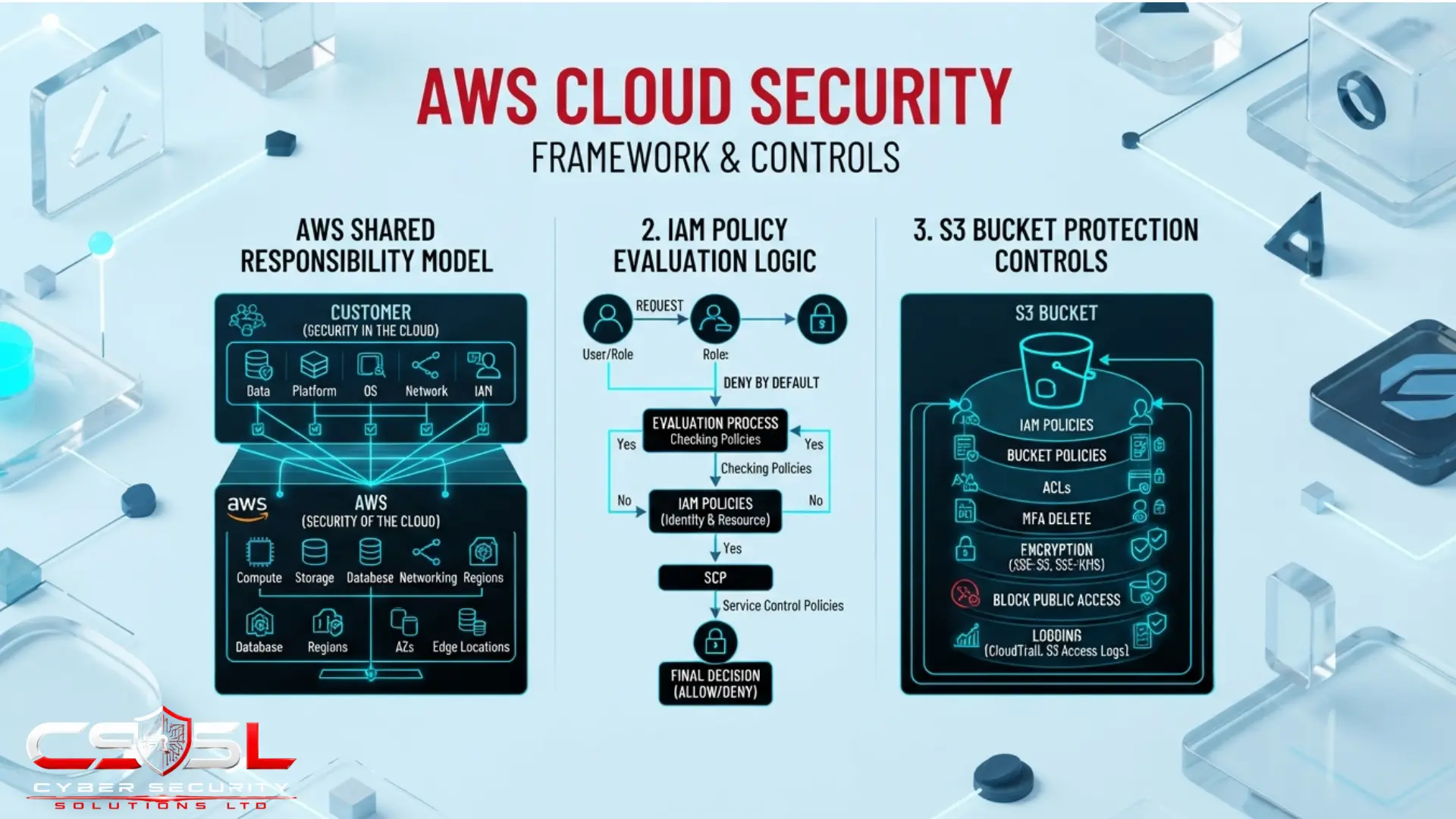
AWS’s shared responsibility model shifts meaningfully by service, with customers holding full patching and configuration responsibility on EC2, only code and IAM role scoping on Lambda, and complete access control responsibility on S3 regardless of how the underlying storage is managed.
If you have dozens of AWS accounts with no consistent security baseline applied across any of them, or an S3 bucket was left publicly accessible for months and you found out from a security researcher rather than your own tools, this guide gives you the concrete AWS mechanics that fix both problems.
What Does AWS-Specific Security Add Beyond the General Principles Already Covered in This Cluster?
Every principle, tool category, and control this cluster has established, CSPM, IAM, zero trust, shared responsibility, applies fully to AWS. This guide shows what those principles look like when applied to AWS’s actual named services and consoles rather than repeating them generically.
AWS remains the most widely adopted public cloud platform and has functioned as the default working vocabulary for network security terminology and shared responsibility framing throughout this cluster, making it the natural anchor for this platform-specific coverage. This post assumes general cloud security fundamentals, the shared responsibility concept itself, and cloud network security mechanics are already understood, none of which are re-explained here.
How Does Shared Responsibility Play Out Across Specific AWS Services?
| Service | AWS Responsibility | Customer Responsibility |
| EC2 | Physical infrastructure, hypervisor | Guest OS patching, security groups, network access |
| Lambda | Entire runtime environment | Function code, dependencies, IAM execution role |
| RDS | Database engine patching | Access control, encryption configuration, query security |
| S3 | Storage infrastructure | Bucket policies, access control, encryption settings |
This service-by-service breakdown matters more than the general IaaS, PaaS, SaaS split most cloud security content relies on, because AWS’s own service catalogue spans that entire range simultaneously within one account. A typical AWS environment does not sit at one point on the responsibility spectrum; it sits at several points at once, depending on which specific services are actually in use.
On EC2, an IaaS-tier service, the customer patches the guest operating system, configures security groups, and manages network access entirely. On Lambda, AWS manages the entire runtime environment, and the customer is responsible only for function code, its dependencies, and the IAM execution role scoping what that function can actually do. On RDS, AWS manages database engine patching, while the customer manages access control, encryption configuration, and query-level security. On S3, AWS manages the storage infrastructure entirely, but the customer holds full responsibility for bucket policies, access control, and encryption settings, since S3’s security failures are almost always configuration failures rather than infrastructure failures.
An organization running all four services simultaneously, which describes most real AWS environments, is managing four genuinely different responsibility profiles at once, not one uniform IaaS-versus-SaaS calculation. A security team applying a single mental model uniformly across every AWS service in use is likely under-attending to at least one of these profiles, since the actual customer obligation on Lambda looks nothing like the actual customer obligation on EC2, despite both technically being covered by the same overarching shared responsibility framework AWS publishes. Treating each service’s responsibility profile as its own specific checklist, rather than assuming one general understanding of shared responsibility covers every service equally, is the practical discipline this section establishes.
How Do You Structure AWS Accounts and Organizations Securely?
AWS Organizations is the multi-account management layer enabling account vending, provisioning new accounts automatically with security guardrails already applied rather than configured individually from scratch. Service Control Policies sit above individual IAM policies as an account-wide guardrail layer, capable of restricting what even an account’s own administrators can do regardless of their individual IAM permissions.
Separate accounts per environment or business unit provide isolation enforced by AWS’s own account boundary, supporting blast-radius containment directly, since a compromised or misconfigured account cannot affect resources in a completely separate account the way a single shared account structure would allow. AWS Control Tower and AWS Landing Zone Accelerator provide AWS’s specific implementation of the landing zone pattern, automating the setup of a well-governed multi-account environment with guardrails, logging, and account structure applied consistently from the outset rather than built manually account by account.
How Does AWS IAM Policy Evaluation Work?
Identity-based policies attach directly to a user, group, or role and define what that identity can do. Resource-based policies attach to the resource itself, an S3 bucket policy, for example, and define who can access that specific resource, meaning a single access decision can depend on two entirely separate policy documents evaluated together. Permission boundaries set the maximum possible permissions an identity-based policy can grant, functioning as a safety ceiling rather than a direct grant.
| Policy Type | Attaches To | Function | Example |
| Identity-based policy | User, group, or role | Defines what the identity can do | Grant full S3 access to a role |
| Resource-based policy | The resource itself | Defines who can access this specific resource | S3 bucket policy allowing an external account |
| Permission boundary | User or role | Caps maximum possible permission | Restrict a role to read-only regardless of grants |
| Service Control Policy | AWS Organizations account/OU | Account-wide guardrail overriding all IAM | Deny all regions except approved ones |
This is the single most common source of AWS IAM confusion, and making the actual evaluation logic concrete and explicit, rather than treating IAM as one undifferentiated concept, is what separates genuinely useful AWS security guidance from AWS documentation lightly repackaged.
The evaluation logic works as follows, and every part of it matters. An explicit deny in any applicable policy always overrides any allow, regardless of which document contains that deny or how permissive every other applicable document might be. Evaluation defaults to deny unless an explicit allow exists somewhere in the applicable policy set, meaning the absence of an explicit allow is functionally identical to an explicit deny. The final access decision considers identity-based policies, resource-based policies, permission boundaries, and Service Control Policies together as one combined evaluation, not any single document reviewed in isolation.
This means a genuinely secure configuration requires checking all applicable layers simultaneously, not confirming that one policy document looks correct and assuming the access decision is settled. Consider a realistic scenario: an IAM identity-based policy grants a role full access to a specific S3 bucket. A permission boundary attached to that same role, however, caps its maximum possible permissions at read-only across all S3 resources. The identity-based policy alone would suggest full access; the permission boundary silently constrains that grant down to read-only, regardless of how the identity-based policy itself is written. Someone reviewing only the identity-based policy would incorrectly conclude the role has write access, when the actual, combined evaluation result is read-only. Understanding that AWS access decisions are the product of multiple, separately-maintained documents evaluated together, with explicit deny and permission boundaries both capable of silently overriding what a single policy document appears to grant, is the specific mechanic that resolves the confusion most IAM troubleshooting conversations eventually run into.
How Do You Secure Amazon S3, the Most Common Source of AWS Misconfiguration?
S3 Block Public Access is an account and bucket-level setting overriding individual bucket policies to prevent public access, widely recommended as the single highest-impact S3-specific control. S3 access decisions can be granted through IAM identity policies, S3 bucket policies, or legacy access control lists simultaneously, meaning a genuinely secure configuration requires checking all three. Enabling default encryption and versioning protects against both unauthorized access and accidental or malicious deletion.
Amazon Macie deserves specific, dedicated attention as AWS’s own native data classification and sensitive-data-discovery service, functioning as AWS’s built-in equivalent to the broader DSPM discipline, and this tool is genuinely underused precisely because most generic cloud security content overlooks it entirely.
Macie scans S3 content specifically for PII and other sensitive data patterns, answering the same fundamental question DSPM tooling addresses generally: not just whether a storage resource is configured securely, but what sensitive data actually sits inside it. An organization with a perfectly configured, non-public S3 bucket containing an unclassified export of customer records has a genuine data exposure risk that S3’s own configuration settings alone would never reveal, since the bucket looks entirely secure from a pure access-control perspective while still holding unclassified sensitive content nobody is actively tracking.
The practical significance here is that many organizations already running AWS have access to this exact capability without realizing it, or without recognizing it as a direct answer to the same discovery and classification need that drives broader DSPM tool evaluation. Rather than immediately evaluating third-party DSPM platforms for S3-hosted data specifically, an AWS-native organization should first assess whether enabling Macie already addresses that specific discovery need, since it is purpose-built for exactly this scenario and typically requires no new vendor relationship to activate. Macie should be evaluated alongside, and potentially before, any third-party DSPM tool specifically for S3-scoped data, reserving broader third-party platforms for organizations needing classification coverage across multiple cloud providers or data warehouse platforms beyond what Macie’s S3-specific scope addresses.
What Native AWS Security Tools Should Form Your Baseline Stack?
AWS Security Hub serves as the central posture aggregation console. GuardDuty provides anomaly and threat detection. IAM Access Analyzer provides entitlement analysis. CloudTrail provides API-level activity logging. Config provides configuration history and compliance evaluation. Audit Manager provides continuous compliance evidence collection. Amazon Macie completes this baseline stack as AWS’s native DSPM-equivalent tool for S3-hosted data specifically.
Security Hub is specifically designed to aggregate findings from GuardDuty, Macie, IAM Access Analyzer, and other AWS-native services into one console, providing a native, lower-cost starting point for cross-tool correlation. Organizations running significant multi-cloud infrastructure alongside AWS should weigh native tooling against third-party CNAPP platforms, since AWS-native tools are not designed to provide equivalent visibility into Azure or Google Cloud environments.
How Do You Secure AWS Compute — EC2, Lambda and Container Services?
EC2 represents the customer’s fullest responsibility surface within AWS, requiring guest OS patching, security group configuration, and general workload protection practices. Lambda requires scoping the function’s IAM execution role as narrowly as genuinely required, since an over-permissioned execution role is one of the most common serverless-specific findings in real AWS environments.
EKS, AWS’s managed Kubernetes offering, requires the same control-plane security practices applying to Kubernetes generally, alongside AWS-specific IAM integration through IAM Roles for Service Accounts, which lets individual Kubernetes workloads assume scoped AWS permissions rather than sharing one broad node-level role. Amazon ECR is the natural point for container image scanning before deployment to ECS or EKS, catching known vulnerabilities before an image ever reaches a running workload.
What Does the AWS Well-Architected Framework’s Security Pillar Recommend?
AWS’s official architectural guidance is organized around design principles including implementing a strong identity foundation, enabling traceability, applying security at all layers, automating security best practices, protecting data in transit and at rest, and preparing for security events.
The strong identity foundation principle reflects broader IAM guidance already established. Applying security at all layers reflects the defence-in-depth principle. Preparing for security events reflects incident response preparation. Use the Security Pillar as a structured, AWS-specific self-assessment lens applied against your own environment, complementing rather than replacing the general architecture guidance covering multi-cloud environments.
What AWS-Specific Compliance and Government Cloud Options Exist?
AWS GovCloud is the direct, concrete AWS instantiation of FedRAMP requirements, an isolated AWS region specifically designed to host workloads requiring FedRAMP High authorization and other stringent US government compliance requirements. The CIS Amazon Web Services Foundations Benchmark is the AWS-specific configuration baseline that CSPM tools, including AWS Security Hub itself, evaluate environments against. AWS Artifact is AWS’s self-service portal providing on-demand access to AWS’s own compliance reports and certifications, a practical resource for demonstrating your provider’s compliance posture as part of your own shared responsibility documentation.
Do You Need a Dedicated AWS Security Specialist, or Does General Cloud Expertise Suffice?
General cloud security principles transfer meaningfully across providers, but AWS’s specific depth, including IAM policy evaluation logic and Organizations structure, genuinely rewards dedicated, platform-specific expertise once an environment reaches meaningful scale or complexity.
This use of cloud security specialist deserves explicit disambiguation, since the identical phrase has already been used to describe a vendor’s market positioning, a company specializing narrowly in one technical area within a broader analyst evaluation category. That is a description of a vendor. This is a genuinely different question entirely: whether your own team or provider relationship needs someone with deep, AWS-specific human expertise, separate from any vendor category question entirely.
The honest answer requires distinguishing between general cloud security knowledge, which transfers meaningfully across AWS, Azure, and Google Cloud, and AWS’s own specific implementation depth, which does not transfer nearly as cleanly. Someone who understands cloud security fundamentals broadly, identity as the primary security boundary, shared responsibility, defence-in-depth, understands the concepts this entire content series has established. Someone who can correctly troubleshoot why a specific S3 access denial is occurring despite an apparently permissive identity-based policy, because a permission boundary or an SCP is silently constraining it, needs AWS-specific depth that general cloud knowledge alone does not provide.
The AWS Certified Security Specialty credential is a named, relevant professional certification worth considering for teams reaching this point. Organizations lacking in-house AWS-specific depth may reasonably consider an MSSP with genuine AWS specialism as an alternative to building that depth internally. Both options address the same underlying gap: general cloud security knowledge is necessary but insufficient once an AWS environment’s own specific mechanics, IAM evaluation logic, Organizations structure, and service-specific responsibility profiles, become the actual source of unresolved risk.
How Do You Build an AWS Security Baseline Step by Step?
Step 1: Enable AWS Organizations and structure accounts by environment or business unit, applying Service Control Policies as an account-wide guardrail layer.
Step 2: Enable S3 Block Public Access at the account level and review existing bucket policies against it.
Step 3: Enable Security Hub, GuardDuty, Macie, and IAM Access Analyzer as your native baseline detection and posture stack.
Step 4: Review IAM policies specifically for identity-based, resource-based, and permission-boundary consistency, checking for unintended combinations.
Step 5: Scope Lambda execution roles and EKS service account roles as narrowly as each function or workload genuinely requires.
Step 6: Enable CloudTrail and Config across every account with adequate retention to support audit and forensic needs.
Step 7: Benchmark your environment against the CIS AWS Foundations Benchmark and the Well-Architected Framework’s Security Pillar.
Step 8: Assess whether your current team’s AWS-specific depth is sufficient, or whether specialist certification, hiring, or managed support is genuinely warranted.
Cyber Security Solutions Ltd helps organizations audit their AWS environment against this exact baseline, identifying which specific policy layers, tools, or account structures need attention first.
Conclusion
Securing AWS effectively means understanding that shared responsibility shifts service by service, that IAM access decisions combine multiple policy documents rather than one, and that native tools like Macie and Security Hub already provide much of the baseline coverage most organizations assume requires third-party purchase. Visit cybersecuritysolutionsltd for an AWS security audit that identifies exactly which policy layers, tools, or account structures need your attention first.
FAQs
It shifts by service. Customers hold full patching and configuration responsibility on EC2, only code and IAM role scoping on Lambda, database access control on RDS, and complete access control on S3 regardless of how the underlying storage is managed by AWS.
An identity-based policy attaches to a user or role, defining what it can do. A resource-based policy attaches to the resource, defining who can access it. A permission boundary caps the maximum possible permission a policy can grant, functioning as a safety ceiling rather than a direct grant.
Amazon Macie is AWS’s native data classification service, scanning S3 content for PII and sensitive data patterns. Any AWS account can enable it directly, meaning many organizations have access to a built-in DSPM-equivalent tool for S3 data without realizing it.
A Service Control Policy is an account-wide guardrail sitting above individual IAM policies within AWS Organizations. It can restrict what even an account’s own administrators can do regardless of their individual permissions, functioning as an organization-wide ceiling rather than a permission grant.
AWS GovCloud is specifically designed to host workloads requiring FedRAMP High authorization and other stringent US government requirements. Whether you need it depends on your specific authorization level and government contract requirements; lower FedRAMP levels may be achievable in standard AWS regions.
General cloud security knowledge transfers across providers for foundational concepts. AWS’s specific mechanics, like IAM policy evaluation logic and Organizations structure, genuinely reward dedicated expertise once your environment reaches meaningful scale, whether through certification, hiring, or an AWS-specialist MSSP.
One Comment