What Is a DMZ in Networking? How a Demilitarized Zone Works
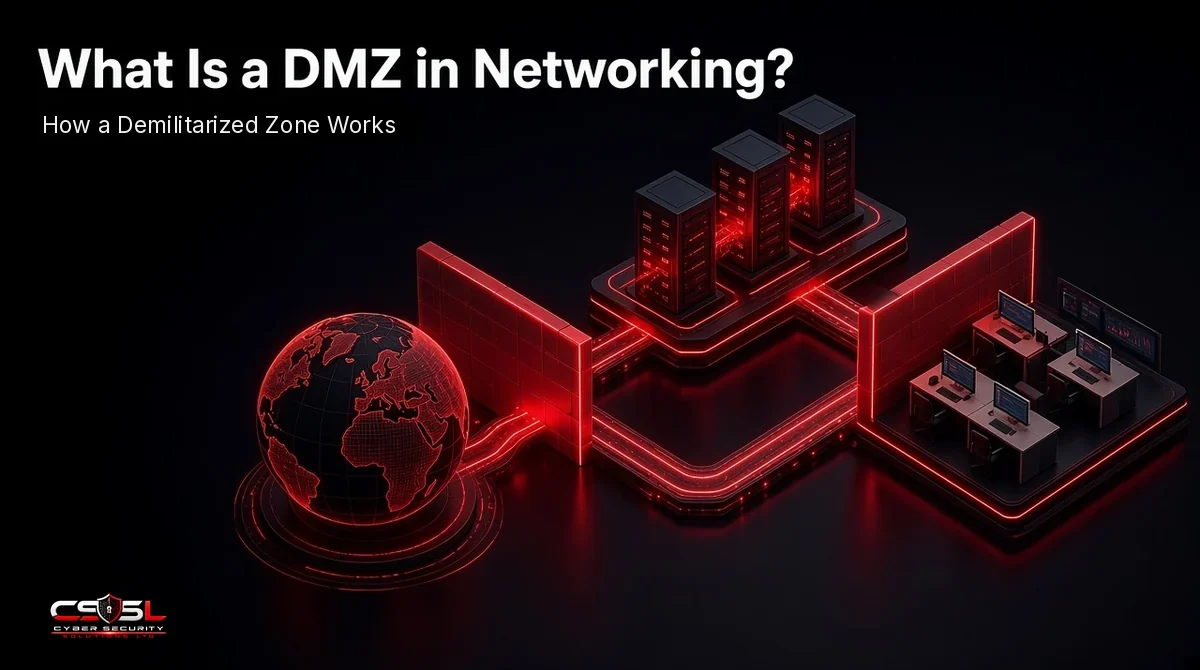
A DMZ in networking is an isolated subnet between the public internet and your internal network that hosts public-facing services such as web, email and DNS servers. Firewalls let outsiders reach those servers but block them from your LAN. The popular myth is that the DMZ is a safe place. It is the most exposed part of your network.
What Is a DMZ in Networking?
A DMZ (demilitarized zone) is a separate network segment that sits logically between untrusted external networks and your trusted internal network. Servers that must accept connections from the internet live there. If one is compromised, firewall rules stop the attacker from moving straight into the local area network (LAN) where your users, files and databases sit.
The National Institute of Standards and Technology (NIST) glossary, drawing on CNSSI 4009 (2022), describes it as a “perimeter network segment that is logically between internal and external networks,” built to give “external, untrusted sources” restricted access to releasable information while shielding internal networks.
Why It Is Called a Demilitarized Zone
The name borrows from the military buffer strip between two opposing territories, where neither side is allowed to station forces. In a network, the DMZ is the buffer between the internet you do not control and the internal network you do. Neither side is fully trusted inside it.
DMZ vs Perimeter Network vs Screened Subnet
These three terms usually mean the same thing. “Perimeter network” is the name Microsoft uses in its Azure reference architectures, which describe “a perimeter network, also called a DMZ.” “Screened subnet” refers to the same idea: a subnet screened by firewall rules on both sides.
How a DMZ Works: Traffic Flow and Firewall Rules
A DMZ works by splitting traffic into three zones (internet, DMZ and internal network) and writing firewall rules for every path between them. The default for each path is deny, and only named services are opened.
Traffic Flow: Internet to DMZ to Internal Network
A typical rule set looks like this:
- Internet to DMZ: allowed only to specific ports on specific servers, such as HTTPS (port 443) to the web server or SMTP (port 25) to the mail relay.
- DMZ to internal network: denied by default. Where a DMZ server must reach an internal database, allow only that server, that database and that port.
- Internal network to DMZ: allowed for administration from a small set of admin workstations, ideally through a jump host.
- Internet to internal network: never allowed directly.
What Goes in a DMZ? Common DMZ Servers and Services
The DMZ holds anything outsiders need to reach:
- Web servers and reverse proxies
- Email servers and SMTP relays
- Public DNS servers
- FTP and SFTP (secure file transfer) servers
- VPN (virtual private network) gateways and remote access portals
- Web application firewalls (WAFs) in front of internal apps
Databases, file shares, domain controllers and backups stay on the internal network.
Single-Firewall vs Dual-Firewall DMZ Architecture
There are two common designs. A single-firewall (three-legged) DMZ uses one firewall with three interfaces: internet, DMZ and LAN. A dual-firewall (back-to-back) DMZ places one firewall between the internet and the DMZ and a second between the DMZ and the LAN.
| Factor | Single-firewall (three-legged) DMZ | Dual-firewall (back-to-back) DMZ |
|---|---|---|
| Hardware | One firewall, three interfaces | Two firewalls in series |
| Cost and effort | Lower | Higher: two rule sets to maintain |
| Single point of failure | Yes: one device compromise exposes all zones | An attacker must defeat two devices |
| Rule complexity | All rules in one place | Rules split, easier to make mistakes between them |
| Typical fit | Small and mid-sized businesses | Regulated, high-value or OT environments |
More firewalls are not automatically better. NIST SP 800-41 Revision 1 (2009) warns that putting one firewall behind another can meet a security goal, “but in general such multiple layers of firewalls can be troublesome.” For most small and mid-sized businesses, a single well-managed next-generation firewall (NGFW) with a tight DMZ rule set beats two firewalls nobody reviews.
Five DMZ Myths That Leave Networks Exposed
Most DMZ failures we see come from assumptions, not missing hardware. These five come up again and again.
Myth 1: “Servers in the DMZ Are Protected”
They are the least protected servers you own. By design, they accept connections from anyone on the internet. NIST SP 800-82 Revision 3 (2023), the government’s operational technology (OT) security guide, says services within a DMZ “must be monitored and protected to avoid compromises that allow attackers to pivot” onward without detection. Treat DMZ hosts as the first servers to patch and the first to monitor. In practice, that means three things: send DMZ server and firewall logs to a central place someone reviews, alert on any connection a DMZ server starts toward the LAN, and alert on outbound connections from DMZ servers to unusual internet destinations. A web server that suddenly connects out to an unknown host is often the first sign it has been taken over.
Myth 2: “The DMZ Setting on My Router Is a DMZ”
It is not. On most consumer and small office routers, “DMZ host” forwards every unsolicited inbound port to one internal device. That device sits on the same LAN as everything else, so there is no separate segment and no rule blocking it from your other machines. If you must expose a device, forward only the ports it needs, or put it on a separate VLAN with its own firewall rules.
Myth 3: “Edge Devices Do Not Need the Same Patching”
VPN gateways, firewalls and file transfer servers in the DMZ are prime targets. Verizon’s 2026 Data Breach Investigations Report (DBIR) found that ransomware victims among small businesses were often hit through compromised credentials (38%) or unpatched vulnerabilities in edge devices (29%). Put every DMZ asset at the top of your patch schedule.
Myth 4: “Network Address Translation Is a Firewall”
Network address translation (NAT) hides internal addresses, but it does not enforce security policy. NIST SP 800-41 Revision 1 (2009) says plainly: “Do not rely on NATs to provide the benefits of firewalls.”
Myth 5: “Once the Rules Are Set, the DMZ Is Done”
Rules drift. A temporary port opened for a supplier two years ago is still open today. Review every inbound rule at least quarterly and remove any rule without a named owner and business reason. A quick review asks four questions of each rule: Which server does it reach? Who asked for it, and are they still here? Does it point to the DMZ or, wrongly, to the LAN? Is the source limited to known addresses where possible? Rules that fail any question get removed or tightened, with the change recorded.
DMZ in Networking for Small Businesses: Do You Need One?
Many small businesses do not need a DMZ in networking terms at all, and some that think they have one do not. The decision rule is simple: you need a DMZ only if you host a service on your own network that people on the internet must reach.
Here is an illustrative example. A 25-person architecture firm runs its website and email in the cloud, but keeps an on-premises file transfer server so clients can upload large drawings. Years ago, someone port-forwarded that server through the office router, so it sits on the same LAN as the accounts PC and the backup drive. If the file transfer software has an unpatched flaw, an attacker who gets in lands on the same network as the backups. Moving that one server into a DMZ, or replacing it with a hosted file-sharing service, removes that path.
If your website, email and file sharing are all hosted by providers, your exposed services live in their infrastructure, not yours, and a DMZ adds little. Focus instead on closing inbound ports entirely.
For UK firms, Cyber Essentials (Requirements for IT Infrastructure v3.3, 2026) applies whether or not you build a DMZ. Your firewall must:
- Block unauthenticated inbound connections by default.
- Have every inbound rule approved and documented by an authorized person, with the business need recorded.
- Remove or disable rules that are no longer needed.
- Keep the administrative interface off the internet unless there is a documented business need and it is protected by multi-factor authentication (MFA) or an IP allow list.
These four controls are a sound DMZ rule-review checklist for US businesses too. Where card data is involved, confirm segmentation scope with your PCI DSS (Payment Card Industry Data Security Standard) assessor.
Is a DMZ Still Relevant? Cloud, OT and Zero Trust
Yes, though it looks different. In the cloud, the same idea becomes subnets and routing. Amazon Web Services (AWS) documentation defines a public subnet as one with “a direct route to an internet gateway,” while a private subnet has none, so internet-facing load balancers go in public subnets and databases in private ones. Microsoft’s Azure reference architecture routes all traffic entering or leaving the virtual network through Azure Firewall in a perimeter network.
In industrial sites, NIST SP 800-82 Revision 3 (2023) recommends a DMZ to separate the OT environment from the enterprise network, with all traffic between the two required to go through services in the DMZ. Zero trust does not abolish the DMZ. It adds identity checks and microsegmentation so that even servers inside the DMZ cannot talk to each other freely.
A DMZ Is a Holding Area, Not a Safe Zone
A DMZ in networking does one job: it limits what an attacker reaches after breaking into a public-facing server. It only works if the servers inside it are patched first, watched closely and blocked from your LAN by default. This week, export your inbound firewall rules and check that every one has an owner, a reason and a DMZ destination, not the LAN. If you want a second pair of eyes on that review, Cyber Security Solutions Ltd offers a free, no-obligation cyber security assessment, which you can request through our contact page.
FAQs
A DMZ is safer than placing public servers on your internal network, but the servers inside it are the most exposed you own. Its protection comes from strict firewall rules that stop a compromised DMZ server reaching the LAN. Patch DMZ servers first, monitor them closely, and deny DMZ-to-LAN traffic by default.
Only if you host a service on your own premises that outsiders must reach, such as a web, mail, file transfer or remote access server. If your website, email and file sharing are cloud-hosted, a DMZ adds little. In that case, block all unsolicited inbound connections and review your firewall rules regularly.
A firewall is the device or software that enforces traffic rules. A DMZ is a network segment created by those rules, sitting between the internet and your internal network. You need a firewall to build a DMZ, but you can run a firewall without one. The DMZ is the zone; the firewall is the gatekeeper.
A DMZ is a place on your network for public-facing servers. A VPN is an encrypted tunnel that lets remote users or sites connect into a network. The two often meet: VPN gateways are commonly placed in the DMZ, so remote connections terminate there and are filtered before reaching internal systems.
If the DMZ is built well, the attacker controls that one server but cannot reach the internal network, because firewall rules block DMZ-to-LAN traffic. You then isolate the server, investigate, rebuild it from a clean image and rotate any credentials it held. A flat network gives the attacker a direct path inward.
No. Port forwarding sends traffic on chosen ports from the internet to one internal device, which still sits on your LAN. A true DMZ places public servers on a separate segment with firewall rules on both sides. A router's "DMZ host" setting is broader still, forwarding every inbound port to one device.